
Test your EUDI wallet against real issuers and verifiers
Run your wallet on real devices against live credential issuers and verifiers, and keep the evidence of every step.
By the Credimi team at Forkbomb BV · Updated 24/10/2026
-
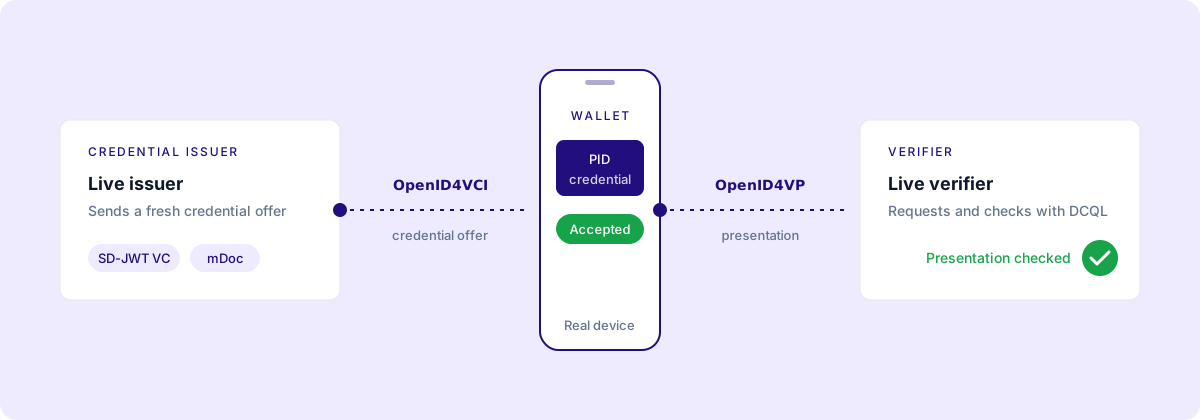
Live issuer
sends a credential offer
-
Your wallet
accepts it on a real device
-
Live verifier
requests and checks it
- Roles
- Wallet, issuer, verifier
- Protocols
- OpenID4VCI 1.0, OpenID4VP 1.0, Drafts 23 and 24
- Formats
- SD-JWT VC, ISO mDoc PID
- FCAF catalog
- 617 test cases in 184 scenarios
EUDI wallet testing is most useful when it puts your wallet in front of the issuers and verifiers it will actually meet. Credimi drives your wallet app on real devices, calls live credential issuers and verifiers, and keeps the evidence of every run. It is open source (AGPL-3.0), built by Forkbomb BV, and you can use it at credimi.io or self-host it.
Why the real ecosystem beats a simulator§
A simulator checks that your wallet handles a credential it already knows. It does not tell you whether your wallet works with the issuer that will send the credential, or the verifier that will ask for it.
Credimi tests your wallet against live credential issuers and verifiers. A real issuer sends a fresh credential offer, your wallet accepts it on a device, and a real verifier requests and checks the presentation. That is the flow an interoperability event or a production verifier will put you through.
The live services come from the Hub, a public catalogue of wallets, credential issuers, verifiers, credentials and verification use cases. Each entry exposes a working flow through a QR code or a deeplink, so you can try it by hand before you automate it. Organizations that publish there include wwwallet, iGrant.io, Validated ID, Hovi, Findynet Cooperative, ShareID and UAB Odifis.
A simulator tells you your wallet handles a known credential; a live issuer and verifier tell you whether it works.
Three roles, tested together§
The EUDI ecosystem has three roles: the wallet, the credential issuer and the verifier (relying party). Credimi tests all three, alone and together.
- Test your wallet against issuers and verifiers published on the Hub, as the published EUDIW issuance (PID SD-JWT) and verification pipeline does on Android, and this one on iOS.
- Test your issuer against wallets that complete the issuance.
- Test your verifier against wallets that complete the presentation.
Interoperability only shows up when the roles run together, which is why a Credimi run can chain issuer, wallet and verifier end to end in one pipeline. The same scenario can also run against many wallets, so you can compare outcomes across implementations. The EUDI wallet interoperability testing guide covers that cross-component view in detail.
What an EUDI wallet testing run covers§
A wallet run drives your app with Maestro on Android devices, emulators and iOS simulators, and calls live issuers and verifiers with StepCI. It then judges the run against FCAF and protocol test cases. Across a run you can exercise:
- Issuance of a PID as an SD-JWT VC through OpenID4VCI 1.0.
- Issuance and presentation of ISO mDoc PID credentials.
- Presentation with OpenID4VP 1.0, plus Drafts 23 and 24, including scenarios that use DCQL.
- Scenarios that use the Digital Credentials API.
- Conformance against the EUDI FCAF and protocol test cases.
The FCAF, the EUDI Functional Conformance Assessment Framework, lists 617 test cases in 184 scenarios as of 20/10/2026. See FCAF conformance testing for how Credimi runs them. For the protocol side, Credimi integrates the OpenID Foundation conformance suite, the WE BUILD / EWC conformance tests and the EUDIW verifier tests; the OpenID4VCI and OpenID4VP conformance guide explains what each one checks.
Credimi does not certify wallets and is not a conformity assessment body. A passing run is evidence you can show and reproduce, not a certificate.
Your devices or ours§
You can run a wallet pipeline on devices available on credimi.io, or connect your own Android devices, emulators and iOS simulators through a credimi-runner. The runner is useful when your build is not public yet, or when you want to test on the exact hardware your team uses.
Either way, devices are queued across teams, so two pipelines do not compete for the same phone, and you can follow a live view of the device while the run is in progress.
Read a result and its evidence§
Every run keeps its evidence, so a failure is something you can inspect rather than guess at:
- A timestamped Temporal history of every step, with its input and output.
- The protocol messages: offers, requests and responses.
- Device video, screenshots and the last frame.
- Device logs.
- SHA-256 hashed FCAF evidence.
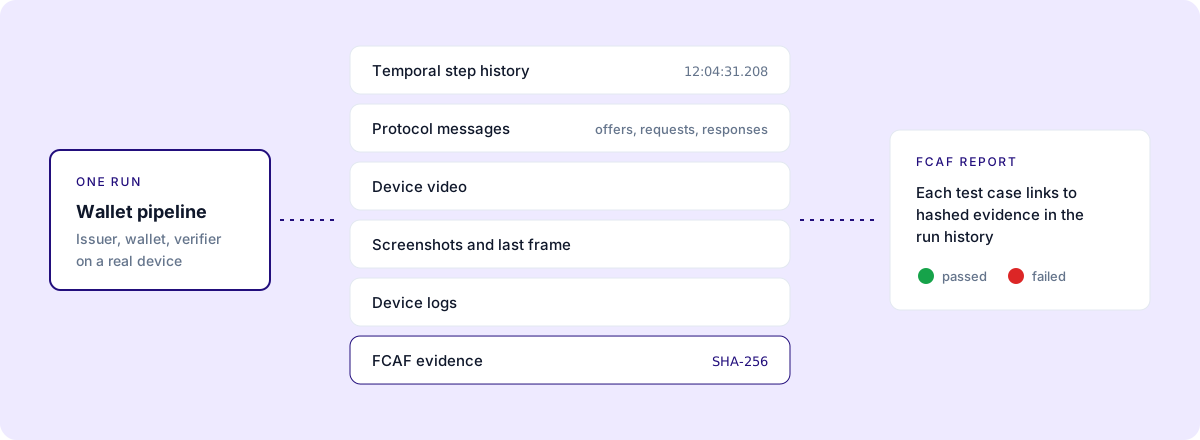
You see which steps passed and which failed, with the artifacts behind each result. The FCAF report links each test case to hashed evidence in the run history, so a reviewer can follow a verdict back to the exact message or screen that produced it. When you publish a pipeline, its results feed the public scoreboard.
Wire EUDI wallet tests into CI§
Once a pipeline passes, keep it passing. Credimi exposes a CI endpoint per role; for wallets it is
run-wallet-apk, which uploads a fresh wallet APK on each commit and runs your pipeline against it.
You can call it directly or through the
Credimi GitHub Action.
You can also schedule runs, so regressions on the issuer or verifier side surface even when your wallet code has not changed. Results come back by API callback or by email. The CI/CD documentation lists the parameters.
Start now§
Browse the Hub to pick the issuers and verifiers you want to interoperate with, then run a
pipeline by following the
first pipeline guide. When it passes, wire
it into CI with the run-wallet-apk endpoint or the GitHub Action. If you are comparing tools, read
why Credimi.
FAQ§
Do I need my own devices?§
No. You can run pipelines on devices available on credimi.io. If you prefer to use your own Android devices, emulators or iOS simulators, connect them through a credimi-runner.
Can I test an iOS wallet?§
Yes, on iOS simulators. Pipelines drive wallet apps with Maestro on Android devices, emulators and iOS simulators.
Which credential formats can I test?§
SD-JWT VC and ISO mDoc PID. Issuance runs over OpenID4VCI 1.0 and presentation over OpenID4VP 1.0, Draft 23 or Draft 24, with scenarios that use DCQL and the Digital Credentials API.
Does a passing run certify my wallet?§
No. Credimi does not certify anything and is not a conformity assessment body. It gives you reproducible results and hashed evidence that you can share.
Run your wallet against real issuers and verifiers
Pick a live issuer and verifier on the Hub and run your wallet against them.